
Remix a track
Remix generates new audio from a track you already have. Use it to change the style, add vocals, or fix one passage — while keeping the track recognisably yours.
Before you start
Section titled “Before you start”- A generated take. Select it under Tracks, then press Remix.
- Credits: a remix is billed like a generation. See Music pricing.
Remix has three tabs. Pick by how far you want to travel from the original:
| Tab | Use it to | Stays close to the original? |
|---|---|---|
| Cover | Re-record the same song in a new style | Closest |
| Morph | Rework the arrangement, add sung vocals | Freer |
| Repaint | Regenerate one section only | Untouched outside the section |
Cover — same song, new style
Section titled “Cover — same song, new style”Cover keeps the melody and structure and changes the sound: instruments, production, feel. Because it follows the source closely, it is the safest way to restyle a track.
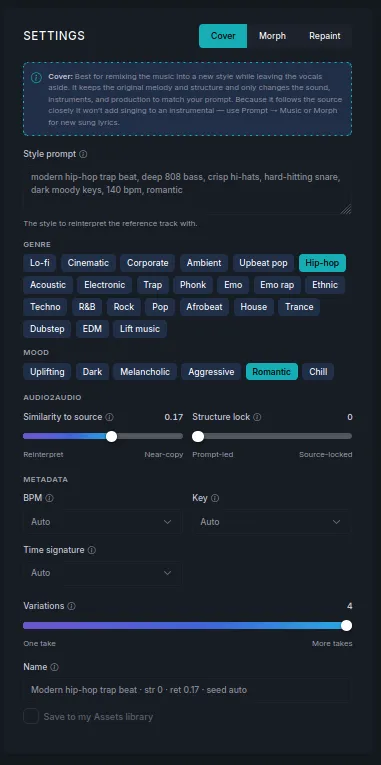
- Write the Style prompt — the style to reinterpret the track in — and optionally pick Genre and Mood chips.
- Set how far it may stray:
- Similarity to source — from a loose reinterpretation to a near-copy.
- Structure lock — from prompt-led to locked to the source arrangement.
- Set Variations and press generate.
Morph — rework it further
Section titled “Morph — rework it further”Morph reworks the arrangement and mood more freely than Cover, and it can sing over your existing music. Expect the result to drift further from the original.
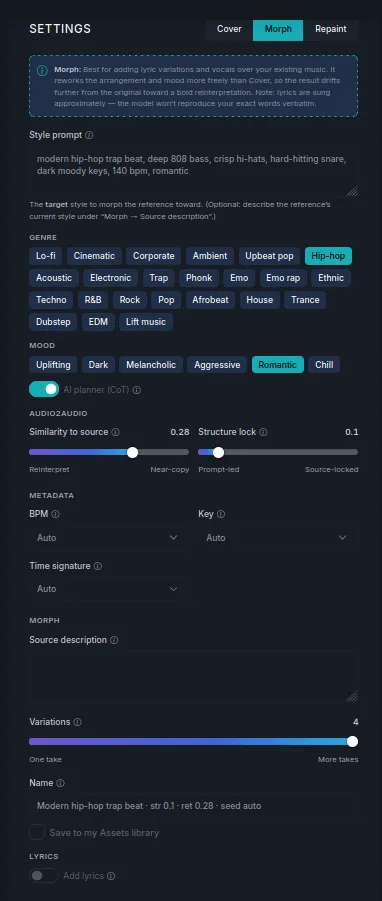
- Style prompt is the target style — where you want it to end up.
- Source description (optional) describes what the track sounds like now, which helps it judge the distance to travel.
- Add lyrics brings in the lyrics tools so the new version can be sung.
Repaint — fix one section
Section titled “Repaint — fix one section”Repaint regenerates a single passage and blends it back into the untouched rest. Good for a section that never quite worked, without risking the parts that did.
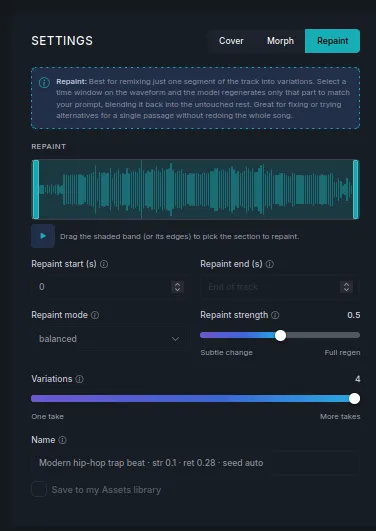
- Drag the shaded band on the waveform, or its edges, over the section to redo. You can also type Repaint start (s) and Repaint end (s).
- Choose a Repaint mode — balanced suits most cases.
- Set Repaint strength: from a subtle change to a full regeneration of that section.
- Set Variations and generate.
Save the result
Section titled “Save the result”Name the result and tick Save to my Assets library to keep it in your Assets. Remixes are saved alongside the original take, which stays unchanged.
Next steps
Section titled “Next steps”- Basic edits — trimming and fades, no regeneration.
- Separate stems — split vocals from instruments.
- Lyrics — write or generate the words Morph will sing.